Showing posts with label Google Maps. Show all posts

Friday, 20 January 2012

Highlight Areas in Google Maps Now is Available

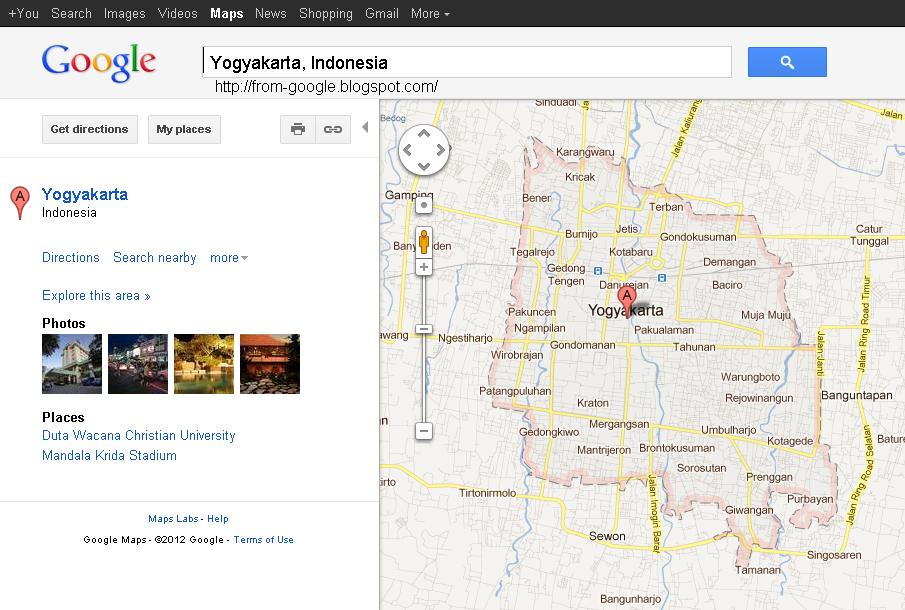
Now, if we find a region/area in Google Maps it will show the areas are highlighted. Area in question will be limited by the color pink and the dashed line in gray.
Example: I am looking for Yogyakarta, Indonesia and looked on Google Maps like the image below.

click image to enlarge

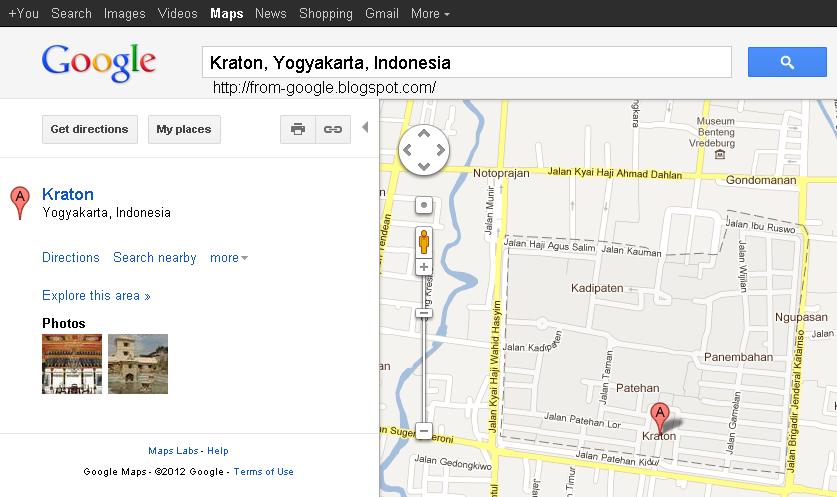
If we are looking for a sub, it will show a dotted line in gray color only, without a shadow of the color pink.
When I look for the Kraton, Yogyakarta, Indonesia on Google Maps it looks like the image below, only the dotted lines gray color that highlights the region.
click image to enlarge

It is certainly easier for us when looking for regional / area via google maps because it automatically highlights the area.


Read also this article:
New favicon in google maps
Jakarta traffic information is available on google maps
How to embed Google Maps into a website or blog?
Add Location in the Article Blogspot
How to find Latitude Longitude of a city/place?

Read More....

Wednesday, 14 December 2011

Add Location in the Article Blogspot

If you want adding location on your article, its easy now.You can look under the compose page. Before this time, you can finding only labels and post options.

Add location of this facility is already emerging in early May 2011. But when it's not perfect. When I tried it there was no change in my blog article.
Now, the facility add location have been perfect.
It is suitable for you who travel frequently, so you can include photos of the location where you can get.
Or it could be to show the place where you write the article. For example when the task out of town, so blog readers know your current location.

How do I add a location in the article?

1.Login to blogger.com
dashboard => design => page elements, see on the blog posts, click edit => check on the location => save.


2. Write an article.
To add locations, see below.
click add => enter the location you want => save.


3. Publish the article, would look like this in your article.

This location direct to Google Maps.
Examples can be found here.

Read More....

Monday, 18 July 2011

How to find Latitude Longitude of a city/place?

How to find Latitude Longitude of a city/place?

1. Open http://www.getlatlon.com/
2. Write the name of the city you are looking for.
Example: I am looking for the Ritz Carlton Hotel San Francisco

3. Locations shown in the center of maps (plus sign).
Look this image:


4. Coordinates Latitude, Longitude is below the map.
Read More....

Sunday, 17 July 2011

How to embed Google Maps into a website or blog?

How to embed google maps into a website or blog?
To put the map on a website or blog is easy, since Google has been providing it for free. Just take a few steps, the map will be attached in a website or blog.

The following way:
1. Open http://maps.google.com/
2. Write the name of the place you want to search.
For example I write Restaurants Central, Doha, Qatar. ( Central Restaurant is one of the Indonesian restaurant in Qatar).
3. If you have found, click the link, will appear a picture like this.


4. Then click Customize and preview embedded map
5. Select size: small, medium, large, or custom (edit width and height). Ajust with your website or blog.
6. Then, copy code, paste in the website.

For embed this google maps in an article: write an article in Edit HTML not Compose.
For embed this google maps in sidebar:
Dashboard >> Design >> in Page Elements click Add a Gadget >> HTML/JavaScript >> Save.

See examples of the results here.
Read More....

Friday, 15 July 2011

Jakarta traffic information is available on google maps

Jakarta traffic information is available on google maps.
Before you travel, you should check the traffic flow in advance so as not stuck in traffic. Google Maps Indonesia, already provides traffic information.
Please open http://maps.google.co.id/

See the following picture:


Roads with dark red with black stripe, and dark red indicates the traffic flow is slow.
Road with a yellow and green lines indicate the flow of traffic, fast or smooth.

Note:
Only available for Jakarta, Indonesia.
For other cities in Indonesia  are not yet available.
Read More....

New favicon in google maps

Google continues to make changes in its products. Now, if you open http://maps.google.com, you can find a new favicon.
Look this images:

before

now

Now, is more fresh and cute. Read More....